Profiles contain only an email and name
The team lacks the role, company, or signal needed to choose a relevant message.

Instantly enrich contact lists with verified professional profiles: job title, seniority, company headcount, industry, and social presence across 650M+ global profiles.
Role · company · signalsEnrichedSaaS · 51–200 employeesGroupedAPI introduction workflowReadyWhen your CRM only has an email address and no professional context, personalized high-ticket sales outreach is impossible.
The team lacks the role, company, or signal needed to choose a relevant message.
Data changes over time but continues to be treated as a current fact.
One generic criterion combines several different needs in the same campaign.
Attributes exist but are not tied to a workflow, owner, or measurable goal.
Enrichment, segmentation, and activation need a clear purpose, minimum required fields, and explicit exclusions.
Find context for a defined use case instead of collecting every available field.
Combine enriched attributes with first-party data and engagement behavior.
Assign the group to relevant content, a delivery path, and an accountable owner.
Review fields, access rights, and exclusion criteria before activation.
The difference lies in how data is reviewed, grouped, and put into action.
Only an email and a few manual fields.
Add the context required for the use case.
Group people under one broad tag.
Combine attributes, behavior, and first-party data.
Export a file and build a campaign manually.
Place an approved segment into the appropriate workflow.
Treat attributes as permanent facts.
Track recency and review important fields.
Source and purpose are unclear.
Limit fields, access, and activation criteria.
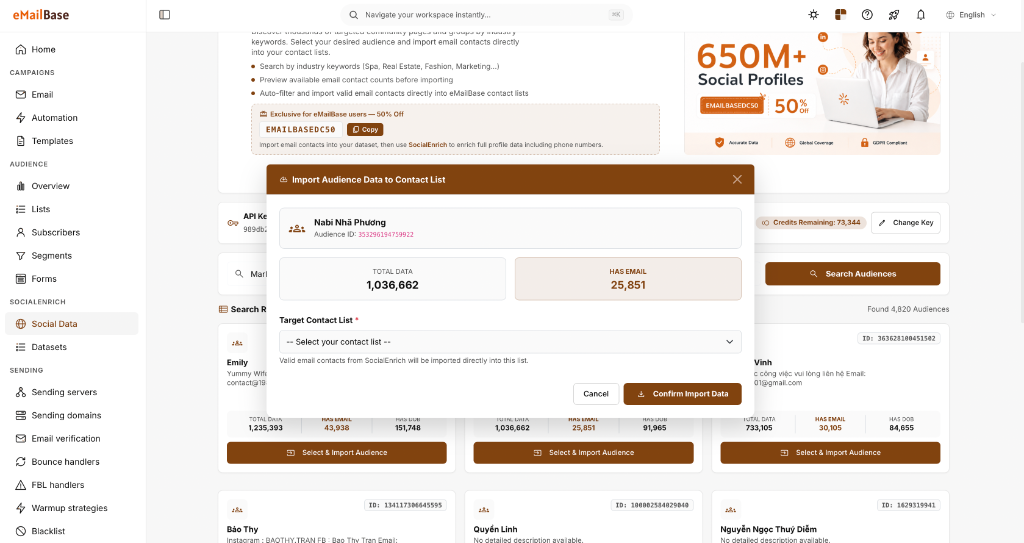
The SocialEnrich Data screen shows where users find and review profile attributes. Enrichment results should be combined with first-party business data before segmentation.
Find a dataset for the use case
Review scale and available email fields
Choose a destination list before import
Measure against the use case, not the maximum number of attributes.
Data groups that enter a journey with an accountable owner.
Compare response and quality by source and enrichment date.
Review the data source, processing purpose, and legal requirements that apply in your market.
No. Enrichment adds attributes; segmentation must still follow a business objective and first-party data.
Segmentation defines a group. Activation places that group into a campaign, workflow, or sales process.
No. Use only necessary fields with a clear purpose and in line with your data policy and applicable rules.
Choose one segment, define the minimum fields, and validate activation before expanding.