Long flows hide the full picture
Vertical step lists make branches and exit conditions difficult to review.

在无限画布上自由绘制客户交互全景:精准行为触发、灵活条件分支、智能延迟计时与目标转化自动跳出。
现代客户全生命周期拥有多重入口、多维行为分支与阶段转化目标,死板的线性列表根本无法清晰承载。
Vertical step lists make branches and exit conditions difficult to review.
Workflows start from manual tags instead of behavior that just occurred.
Exclusions, priorities, and frequency limits are missing.
The team cannot see which node caused contacts to exit or convert.
The canvas is only the surface. Operational value comes from triggers, logic, frequency controls, and node-level reporting.
Arrange triggers, branches, delays, and actions into a map the team can review.
Receive behavior from forms, websites, products, or sales systems through APIs and webhooks.
Remove converted contacts or cap the number of emails within a period.
Compare contacts entering, exiting, and completing each node.
A responsive workflow changes how the team designs, reviews, and hands over automation.
A long step list hides branching.
The canvas shows triggers, conditions, and exits.
Import contacts or apply tags manually.
Receive events through forms, APIs, or webhooks.
Every contact receives the same sequence.
Branch by behavior and customer attributes.
Rely on conventions outside the system.
Add exclusions directly to the workflow.
Depend on the original builder.
A readable map and node states let another team take over.
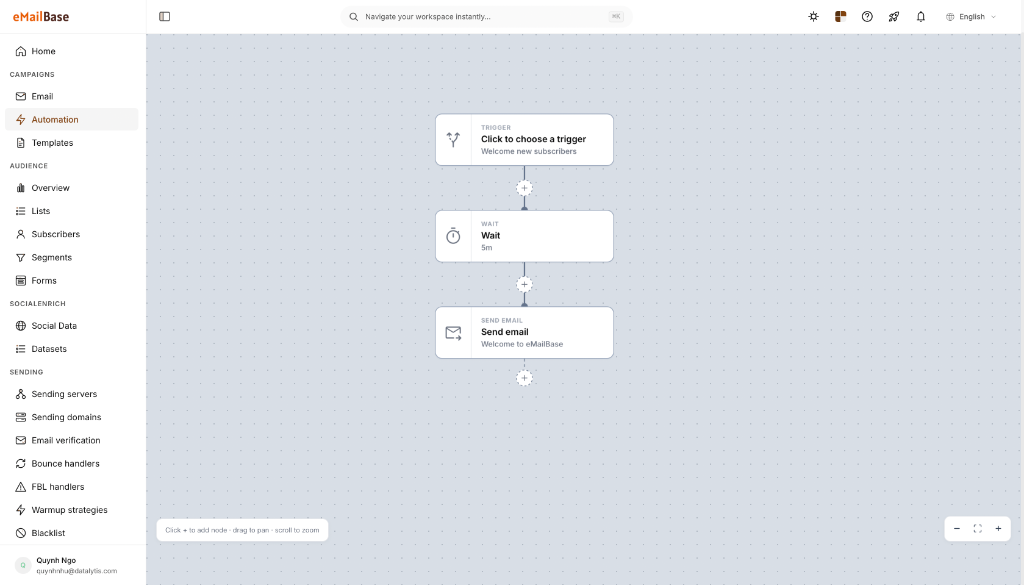
The automation screenshot shows the canvas, trigger node, delay, and sending action—the right context for explaining how a team builds and reviews a journey.
Journey entry trigger
Delay between steps
Sending action and next connection
The share of contacts reaching the final journey goal.
Identify the condition or content responsible for a major drop.
Time from the entry event to the target action.
Start small, define the goal, and add branches only when the data supports a decision.
Yes, but use priority, exclusion, and frequency rules to prevent overlapping messages.
Yes. Use the REST API or webhooks to pass the necessary events and attributes into eMailBase.
Choose a journey with a clear trigger and goal, such as onboarding, abandoned cart, or renewal reminders.
Choose one trigger and one goal, then build the first workflow with test data.