Software fees grow with stored contacts
Budget is tied to database size rather than the email volume the business actually sends.

Connect private sending servers into one centralized orchestration hub. eMailBase load-balances traffic based on your policies, secures queues, and keeps domains primed.
Dedicated quota and reputationActiveCampaign fallback routeReadyPersonal email from the teamConnectedWhen marketing blasts, transactional receipts, and sales outreach share one server, a single reputation dip damages your entire brand.
Budget is tied to database size rather than the email volume the business actually sends.
Teams split campaigns themselves and monitor limits across several provider accounts.
A restriction on one account can stop an entire campaign halfway through its queue.
Reputation, configuration, and operating history are hard to carry forward from a closed platform.
Each capability manages a different layer: connection, traffic allocation, queue continuity, and route-level observability.
Manage Amazon SES, SendGrid, Mailgun, Gmail OAuth, and private SMTP from one inventory.
Select routes by email type, available quota, audience, or an internal sending policy.
Monitor status so the team knows which route can take over the queue when needed.
Separate bounce, complaint, throughput, and connection errors by provider.
The meaningful difference is the workflow change, not another list of feature checkmarks.
Sign in and configure each tool separately.
Register every sending route in one controlled inventory.
Split lists and campaigns by hand.
Define routing policy before a campaign starts.
Find another route after the queue has stopped.
Prepare fallback capacity and monitor readiness in advance.
Reports remain isolated and hard to compare.
Compare provider, domain, and campaign signals together.
Workflow remains tied to a closed delivery platform.
Keep the data and automation layers while changing the sending route.
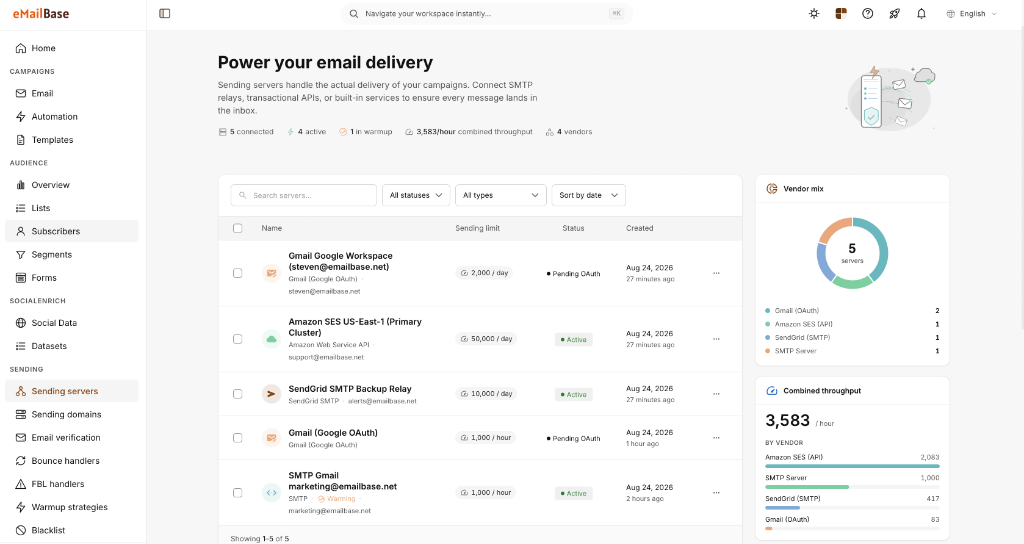
The Sending Servers screen shows the connection type and current status of each route. It explains infrastructure management directly instead of using an unrelated product screenshot.
Connection type for each route
Current sending limit
Status and latest update
Track authentication, throttling, and availability errors for each provider.
Compare list quality and sender reputation by sending domain.
Measure the time from route failure detection until the queue resumes.
Clarify the boundary between eMailBase orchestration and the sending provider.
No. You use an account with a provider such as Amazon SES or SendGrid; eMailBase supplies the management, routing, and automation layer above it.
Yes. You can organize separate routes and assign each one a purpose, such as transactional, marketing, or fallback delivery.
The switching policy must reflect your operating rules. eMailBase provides route status and orchestration controls to implement that policy.
Create a workspace, connect one provider, and validate the routing workflow with test data.