DNS records are missing or overlap
Incorrect SPF, DKIM, or DMARC records make the sending source difficult to verify.

リアルタイムDNS診断、4週間の自動IP&ドメインウォームアップ、リストクリーニング、スパムトラップ予防で到達率を最大化。
v=spf1 include:...Validemailbase._domainkeyValidp=none · rua=mailto:...ReviewDNS設定の誤りや急激な配信通数の増加は、GmailやYahooのスパムフィルターを即座に作動させます。
Incorrect SPF, DKIM, or DMARC records make the sending source difficult to verify.
A new domain or IP sends a sudden spike before establishing a stable history.
Invalid addresses and objecting recipients continue to appear in later campaigns.
Early signals from configuration, queues, and providers remain invisible.
No button can guarantee inbox placement. A disciplined process reduces preventable errors and surfaces negative signals earlier.
See each record status, the value to add, and the next verification step.
Set a ramp for a new domain or IP and adjust it using actual provider feedback.
Use delivery feedback to remove invalid addresses and suppress objecting recipients.
Separate configuration failures from list-quality or campaign-content issues.
The difference lies in when a problem is found and who is responsible for resolving it.
Run isolated checks across several tools.
Use one checklist for SPF, DKIM, and DMARC.
Increase volume on a fixed calendar.
Adjust the schedule using delivery feedback.
Review only the total after a campaign.
Classify failures and suppress invalid addresses before the next send.
Feedback stays inside each provider.
Centralize signals and apply suppression rules.
Rely mainly on instinct.
Use configuration, history, and queue status together.
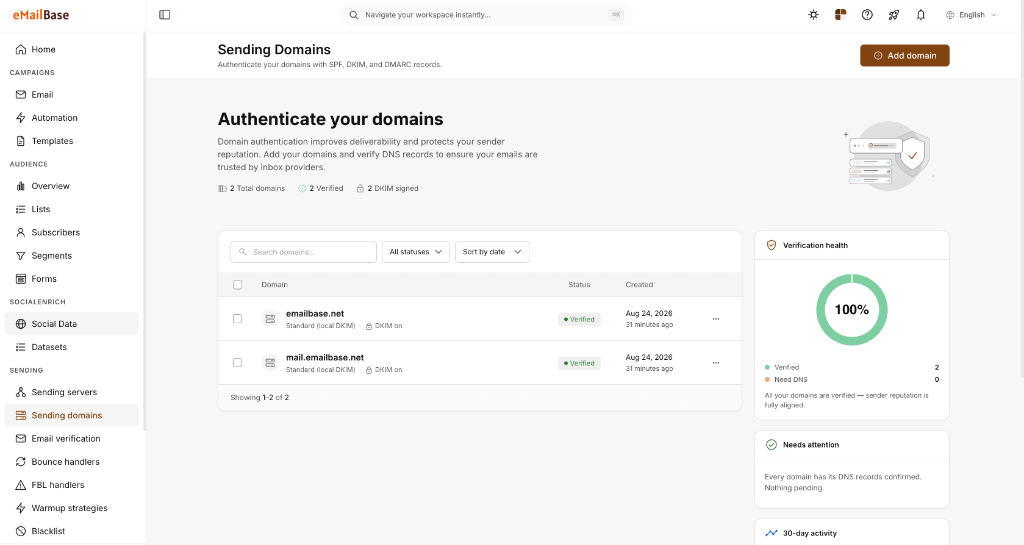
The Sending Domains screen shows which domains have been added and their current verification state. Performance metrics should be interpreted alongside provider and campaign data.
Verified sending domains
DKIM status for each domain
Configuration warnings that need action
Domains with completed SPF, DKIM, and an appropriate DMARC policy.
Addresses that do not exist or are permanently rejected.
Recipient objections tracked by campaign and list source.
Marketing, engineering, and data owners each have a defined responsibility.
No. Authentication is foundational, but content, frequency, list quality, and recipient engagement still affect placement.
Consider warmup for a new domain or IP and after significant volume changes. Use actual delivery feedback to shape the schedule.
Place hard-bounced addresses on a suppression list to prevent repeated failures and protect sender reputation.
Connect a test domain and review authentication records before the next campaign.