Who deploys the application?
Plan for Laravel, databases, queues, monitoring, backups, and updates.

Both models can work with sending providers you control. The main difference is the application layer: deploy and customize Laravel yourself, or use SaaS so marketing can operate without maintaining the application.
Mailcoach suits Laravel teams that want deep product integration. eMailBase suits businesses that need a ready-to-use workspace without maintaining the application layer.
Plan for Laravel, databases, queues, monitoring, backups, and updates.
Separate UI configuration from changes that require code and deployment.
Check whether user management is included or integrated with an internal system.
Distinguish data, provider accounts, source code, and workflow configuration.
Compare the engineering effort required with the level of readiness marketing receives.
Mailcoach · Self-hosted Laravel
eMailBase · BYO SaaS
Run as a standalone app or integrate with Laravel; your team maintains the runtime.
Create a SaaS workspace, connect providers, and configure sending domains.
Configure providers such as SES, Mailgun, SendGrid, or Postmark in the application environment.
Manage multiple providers and connection health in one routing layer.
Software license plus hosting, database, queues, and maintenance effort.
Workspace fee plus direct charges from your sending providers.
Workflows with triggers and actions, extendable through Laravel and application code.
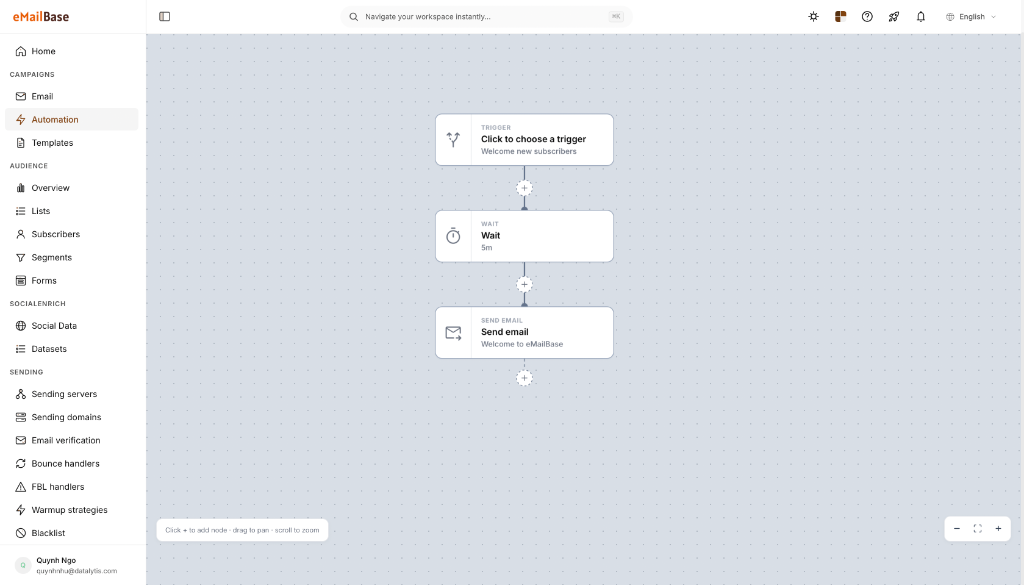
Multi-branch canvas for conditions, delays, and events managed by marketing.
Lists, segments, custom fields, and records live in your managed database.
Profiles, tags, and events are shared across segmentation, automation, and reporting.
Access depends on deployment; package integrations rely on the host application for user management.
Sub-users, roles, and scoped API keys are available in the workspace.
Deep integration through Laravel, events, commands, and application code.
REST API and webhooks integrate systems without source-code access.
Processes provider feedback after configuration; your team still manages DNS and reputation.
DNS, bounce, suppression, and provider status are centralized in one interface.
Full source-code and database control, with responsibility for backup, upgrades, and recovery.
No application source access; exported data and provider accounts remain under your control.
Mailcoach information was checked against Mailcoach Self-Hosted, technical documentation, the Spatie product page. Features, limits, and prices can change; verify them before making a decision.
The decision is whether source-code flexibility justifies the long-term application operations it requires.
Timing depends on data volume, active automations, integrations, and your approval process.
Confirm owners, contacts, consent, suppressions, and active journeys.
Configure sending providers, access permissions, and required DNS records.
Move one priority workflow; verify triggers, exit rules, and webhooks.
Increase volume only after bounce, unsubscribe, and reporting data are stable.
Keeping a sending provider does not automatically migrate workflows or application integrations.
Mailcoach Self-Hosted is a Laravel application your team deploys and maintains. eMailBase manages the SaaS application while still allowing you to connect separate sending-provider accounts.
Without long-term Laravel capacity, SaaS removes responsibility for deployment, queues, databases, backups, and application upgrades.
Usually, if eMailBase supports it and the account belongs to your business. Recheck API credentials, permissions, webhooks, DNS, and feedback handling.
Custom code, Laravel logic, workflows, user management, and internal integrations must be inventoried, mapped, and rebuilt for the destination platform.
Connect an existing sending provider and let marketing validate automation, access control, and reporting on a small dataset.